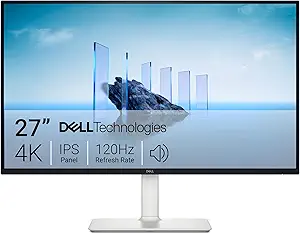
4K gaming monitors split quickly between affordable IPS displays, faster dual-mode panels, and premium OLED screens with much deeper contrast. I rank the ASUS ROG Swift PG32UCDMR as the best overall pick because it combines 4K OLED image quality, a 240Hz refresh rate, DisplayPort 2.1, and strong color coverage without feeling narrowly built for one platform. The LG 27G810A-B stands out for players who want a sharper 27-inch 4K screen that can switch to FHD 360Hz, while the Dell S2725QC makes more sense for buyers who want a clean 4K 120Hz setup for work and casual gaming. The main tradeoffs are size, refresh rate, panel type, OLED burn-in care, HDMI 2.1 support, and whether a cheaper QHD monitor belongs in the conversation at all. Continue reading for the full breakdown of which models fit serious PC gaming, console play, desk-friendly setups, and budget-limited builds.
Key Takeaways
The ASUS ROG Swift PG32UCDMR earns the top spot because it pairs 4K, 240Hz, QD-OLED contrast, USB-C power, and DisplayPort 2.1 better than any other model in this lineup.Dual-mode monitors are the clearest pattern here: the LG 27G810A-B, ASUS XG32UCWMG, ASUS XG32UCG, and ASUS XG27UCG all trade pure 4K focus for a useful lower-resolution speed mode.The Dell S2725QC and Dell S2725QS are easier to justify for mixed work and gaming than for competitive play because their refresh rates and gaming extras sit below the faster ASUS, LG, Acer, and Samsung options.The two QHD models, the Acer KG271U and Samsung Odyssey G5 G51F, fall lower in a 4K gaming monitor roundup because they may be good gaming displays, but they do not meet the core 4K promise.Premium pricing buys more than speed here: the OLED ASUS models add contrast, response time, color depth, and burn-in protection features, while the IPS picks lean harder on value and lower maintenance.
Our Top 4K Gaming Monitors Picks
Dell S2725QS 27-inch 4K Monitor with AMD FreeSync PremiumBest Everyday 4K PickScreen size: 27-inchResolution: 3840 x 2160 4KRefresh rate: Up to 120HzVIEW LATEST PRICESee Our Full BreakdownAcer Nitro 27” 4K UHD Gaming IPS Monitor with AMD FreeSync and DFR TechnologyBest Budget 4K EntryScreen size: 27-inchResolution: 3840 x 2160 UHDRefresh rate: Up to 72Hz at UHD, up to 144Hz at FHDVIEW LATEST PRICESee Our Full BreakdownLG 27G810A-B 27-inch Ultragear 4K UHD IPS Gaming MonitorBest Overall 27-Inch 4K Gaming MonitorScreen size: 27-inchResolution: 3840 x 2160 4K UHDRefresh rate: Up to 180Hz at UHD, up to 360Hz at FHDVIEW LATEST PRICESee Our Full BreakdownAcer Nitro 27” 4K UHD Gaming IPS Monitor with AMD FreeSync Premium and DFR TechnologyBest Fast 4K ValueScreen size: 27-inchResolution: 3840 x 2160 UHDRefresh rate: Up to 160Hz at UHD, up to 320Hz at FHDVIEW LATEST PRICESee Our Full BreakdownAcer Nitro KG271U 27 Inch QHD IPS Gaming MonitorBest 1440p AlternativeScreen size: 27-inchResolution: 2560 x 1440 QHDRefresh rate: Up to 180HzVIEW LATEST PRICESee Our Full BreakdownASUS ROG Strix XG32UCWMG 32-inch 4K OLED Gaming MonitorBest Dual-Mode OLEDScreen size: 32 inchesResolution: 3840 x 2160Panel type: WOLED, TrueBlack GlossyVIEW LATEST PRICESee Our Full BreakdownDell S2725QC 27-inch 4K USB-C MonitorBest Everyday 4K ValueScreen size: 27 inchesResolution: 3840 x 2160Panel type: IPS LEDVIEW LATEST PRICESee Our Full BreakdownASUS ROG Strix XG32UCG 32-inch 4K HDR Gaming MonitorBest 4K IPS for Competitive PlayScreen size: 31.98 inchesResolution: 3840 x 2160Panel type: Fast IPSVIEW LATEST PRICESee Our Full BreakdownSamsung Odyssey G5 G51F 27-inch QHD Gaming MonitorBest Budget 1440p FallbackScreen size: 27 inchesResolution: 2560 x 1440 QHDRefresh rate: 180HzVIEW LATEST PRICESee Our Full BreakdownSamsung Odyssey G7 G75F 37-inch 4K Curved Gaming MonitorBest Big-Screen Curved 4KScreen size: 37 inchesResolution: 3840 x 2160Panel type: VAVIEW LATEST PRICESee Our Full BreakdownASUS ROG Swift PG32UCDMR 32-inch 4K OLED Gaming MonitorBest Premium OLED PickScreen size: 31.5 inchesResolution: 3840 x 2160Panel type: QD-OLEDVIEW LATEST PRICESee Our Full BreakdownASUS TUF Gaming VG27UQ1A 27-inch 4K HDR MonitorBest Mainstream 4K PickScreen size: 27 inchesResolution: 3840 x 2160Panel type: Fast IPS LCDVIEW LATEST PRICESee Our Full BreakdownASUS ROG Strix XG27UCG 27-inch 4K HDR Gaming MonitorBest Dual-Mode 27-Inch PickScreen size: 27 inchesResolution: 3840 x 2160 UHDPanel type: Fast IPS LEDVIEW LATEST PRICESee Our Full Breakdown
More Details on Our Top Picks
Dell S2725QS 27-inch 4K Monitor with AMD FreeSync Premium
I rank the Dell S2725QS as the easiest everyday 4K choice here because it balances sharp 27-inch UHD detail, 120Hz gaming, and comfort features without chasing esports extremes. Compared with the LG 27G810A-B, it gives up higher refresh options and stronger gaming extras, but it should make more sense for buyers who split time between console games, PC play, streaming, and work. The IPS panel, 99% sRGB coverage, and 1500:1 contrast make it a cleaner all-rounder than the QHD Acer KG271U if 4K clarity is the point. The tradeoff is expandability: no USB ports are listed, and the built-in speakers are more convenience than serious audio. I would treat this as the balanced pick, not the enthusiast one.
Best for: Players who want a clean 27-inch 4K monitor for mixed gaming, media, and desk work without paying for high-end dual-mode speed.
Not ideal for: Competitive PC players chasing 160Hz-plus 4K or 300Hz-plus FHD modes, since the LG 27G810A-B and Acer Nitro VG270K go further.
Screen size:27-inchResolution:3840 x 2160 4KRefresh rate:Up to 120HzResponse time:0.03msPanel type:IPSColor coverage:99% sRGBAdaptive sync:AMD FreeSync PremiumContrast ratio:1500:1Speakers:Integrated
Bottom line: Pick the Dell S2725QS if I want 4K clarity, comfort, and simple gaming smoothness more than specialist speed.
Acer Nitro 27” 4K UHD Gaming IPS Monitor with AMD FreeSync and DFR Technology
The Acer Nitro 27-inch 4K UHD earns its place as the value-minded entry because it gives buyers true 4K, IPS color, HDR10, and FreeSync without the heavier feature set of the Acer Nitro VG270K. Its DFR mode is the main decision point: 72Hz at UHD is fine for cinematic games and console-style play, while 144Hz at FHD gives faster motion when resolution matters less. Compared with the Dell S2725QS, this Acer offers wider DCI-P3 color coverage and a lower listed response time, but Dell has the smoother 120Hz native 4K spec. I would choose this only if price and flexibility matter more than staying fast at 4K. The biggest drawback is clear: 72Hz UHD can feel tame beside newer 160Hz and 180Hz 4K models.
Best for: Budget-focused buyers who want 4K sharpness for single-player games and media, with an FHD speed mode for lighter competitive play.
Not ideal for: Players buying a monitor specifically for high-refresh 4K PC gaming, since 72Hz at native UHD trails the Dell S2725QS, Acer VG270K, and LG 27G810A-B.
Screen size:27-inchResolution:3840 x 2160 UHDRefresh rate:Up to 72Hz at UHD, up to 144Hz at FHDResponse time:Up to 0.5ms GTGPanel type:IPSColor gamut:95% DCI-P3HDR:HDR10Ports:1 DisplayPort 1.4, 2 HDMI 2.0Mounting:VESA 100 x 100mm
Bottom line: Choose this Acer Nitro if I want affordable 4K first and can accept modest native refresh speed.
LG 27G810A-B 27-inch Ultragear 4K UHD IPS Gaming Monitor
The LG 27G810A-B sits at the top of this batch because it offers the clearest gaming split: 4K at up to 180Hz for visual detail or FHD at up to 360Hz when speed takes priority. Compared with the Dell S2725QS, it is a more serious gaming display, with G-SYNC compatibility, FreeSync Premium, HDMI 2.1, USB ports, and a fully adjustable stand. Compared with the Acer Nitro VG270K, it pushes native 4K refresh higher, though Acer answers with a faster listed 0.5ms response claim and 320Hz FHD mode. The LG is not the cheapest route to 4K, and DisplayHDR 400 is entry-level HDR rather than a premium HDR experience. Still, I see it as the best blend of resolution, speed, and setup flexibility among these five.
Best for: PC and console players who want one 27-inch monitor that can handle sharp 4K story games and very fast competitive modes.
Not ideal for: Buyers who only play casual games or mostly work in office apps, since the Dell S2725QS gives enough 4K smoothness for less demanding use.
Screen size:27-inchResolution:3840 x 2160 4K UHDRefresh rate:Up to 180Hz at UHD, up to 360Hz at FHDResponse time:1ms GTGPanel type:IPSColor gamut:95% DCI-P3HDR:VESA DisplayHDR 400, HDR10Adaptive sync:NVIDIA G-SYNC Compatible, AMD FreeSync PremiumPorts:2 HDMI 2.1, DisplayPort 1.4, USB upstream, 2 USB downstream
Bottom line: The LG 27G810A-B is the one I would prioritize when 4K sharpness and competitive speed both matter.
Acer Nitro 27” 4K UHD Gaming IPS Monitor with AMD FreeSync Premium and DFR Technology
The Acer Nitro VG270K is the performance value pick because it brings 4K at up to 160Hz and FHD at up to 320Hz into a 27-inch IPS design. It lands between the simpler Acer Nitro 72Hz UHD model and the more fully equipped LG 27G810A-B: faster than the budget Acer at native 4K, but less feature-rich than the LG, which adds 180Hz UHD, G-SYNC compatibility, USB, and broader stand adjustment details. The VG270K also has HDMI 2.1, which makes it a better fit for modern consoles than the HDMI 2.0 Acer model. Its tradeoffs are price and confidence in DFR support; buyers need compatible hardware to get the headline modes. I would choose it when speed matters, but extras matter less than the refresh spec.
Best for: Value-focused PC or current-gen console players who want high-refresh 4K without stepping up to a more expensive premium gaming monitor.
Not ideal for: Desk setups that need USB hub features, richer ergonomics, or G-SYNC branding, where the LG 27G810A-B is the more complete choice.
Screen size:27-inchResolution:3840 x 2160 UHDRefresh rate:Up to 160Hz at UHD, up to 320Hz at FHDResponse time:Up to 0.5ms GTGPanel type:IPSColor gamut:90% DCI-P3HDR:HDR10Ports:1 DisplayPort 1.4, 2 HDMI 2.1Mounting:VESA 100 x 100mm
Bottom line: The Acer Nitro VG270K is the pick I would make for fast 4K gaming when refresh rate matters more than premium conveniences.
Acer Nitro KG271U 27 Inch QHD IPS Gaming Monitor
The Acer Nitro KG271U is the outlier in a 4K gaming monitor roundup, so I would only include it as the 1440p alternative for buyers who care more about frame rate than pixel count. Its 2560 x 1440 resolution is visibly less sharp than the Dell S2725QS, Acer VG270K, or LG 27G810A-B, especially for text, UI detail, and large open-world scenes. The upside is that QHD is easier for a midrange GPU to drive, and 180Hz with FreeSync can feel more responsive than entry 4K screens in competitive games. Compared with the 72Hz UHD Acer Nitro, this model favors motion over detail. The catch is simple: it does not satisfy the main 4K promise. I would treat it as a smart detour, not a true 4K pick.
Best for: PC gamers with midrange graphics cards who want smoother frame rates at 27 inches and are willing to give up 4K resolution.
Not ideal for: Anyone specifically shopping for 4K sharpness for console gaming, detailed RPGs, or desktop clarity, since this is a QHD monitor.
Screen size:27-inchResolution:2560 x 1440 QHDRefresh rate:Up to 180HzResponse time:Up to 0.5ms GTGPanel type:IPSColor gamut:95% DCI-P3HDR:HDR10Ports:1 DisplayPort 1.2, 2 HDMI 2.0Brightness:250 cd/m²
Bottom line: Choose the Acer Nitro KG271U only if I am willing to trade 4K detail for easier-to-drive speed.
ASUS ROG Strix XG32UCWMG 32-inch 4K OLED Gaming Monitor
I rank the ASUS ROG Strix XG32UCWMG highest in this batch for players who want both cinematic 4K and serious speed. Its 4K 240Hz OLED mode is stronger for premium PC and console gaming than the ASUS ROG Strix XG32UCG, while the FHD 480Hz mode gives competitive players more headroom than Samsung’s 37-inch Odyssey G7. The glossy WOLED panel should deliver cleaner perceived clarity and richer blacks than IPS or VA options here, which matters when 4K detail is the point. The tradeoff is ownership care: OLED still asks more from the buyer than the Dell S2725QC or Samsung Odyssey G5, and USB-C power is only 15W. I would pick it for a high-end desk, not a low-maintenance shared setup.
Best for: PC gamers with a high-end GPU who want 4K 240Hz image quality and a faster esports mode in one screen
Not ideal for: Buyers who leave static apps open all day or need strong laptop charging over USB-C
Screen size:32 inchesResolution:3840 x 2160Panel type:WOLED, TrueBlack GlossyRefresh rate:4K 240Hz or FHD 480HzResponse time:0.03ms listedAdaptive sync:G-SYNC Compatible, FreeSync Premium ProHDR:VESA DisplayHDR 400 True BlackConnectivity:DisplayPort 1.4 DSC, HDMI 2.1, USB-C with 15W power deliveryWarranty:3 years with burn-in coverage
Bottom line: I would buy this for a flagship 4K gaming setup where OLED contrast and dual-mode speed both matter.
Dell S2725QC 27-inch 4K USB-C Monitor
The Dell S2725QC is the most practical 4K pick here for buyers splitting time between work, streaming, and lighter gaming. Compared with the ASUS ROG Strix XG32UCWMG, it gives up OLED contrast, 240Hz speed, and true enthusiast gaming features, but its 27-inch 4K IPS panel keeps text and game HUDs crisp without taking over a desk. The 120Hz refresh rate is a real step up from basic 60Hz office monitors, though it will not satisfy players chasing the ASUS XG32UCG’s 160Hz/320Hz dual-mode flexibility. I like its 65W USB-C angle for laptop-and-console desks, plus built-in speakers reduce clutter. The gaming ceiling is lower, HDR is modest, and the 4ms response time trails the faster panels in this lineup.
Best for: Students, hybrid workers, and casual gamers who want one clean 4K USB-C display for a laptop and a console
Not ideal for: Competitive PC players who want 160Hz, 240Hz, OLED contrast, or low-latency gaming extras
Screen size:27 inchesResolution:3840 x 2160Panel type:IPS LEDRefresh rate:Up to 120HzResponse time:4msColor coverage:99% sRGBConnectivity:USB-C with up to 65W power delivery, HDMIAdaptive sync:AMD FreeSync PremiumWarranty:1-year Advanced Exchange Service and Premium Panel Exchange
Bottom line: I would choose this as the sensible 4K monitor for a desk that works all day and games after hours.
ASUS ROG Strix XG32UCG 32-inch 4K HDR Gaming Monitor
The ASUS ROG Strix XG32UCG sits between the practical Dell S2725QC and the flashier ASUS XG32UCWMG OLED. Its appeal is balance: 4K 160Hz is fast enough for demanding single-player and multiplayer games, while the FHD 320Hz mode gives esports players a lower-resolution speed setting without buying a second monitor. Compared with the Samsung Odyssey G7, it is smaller and flat, which may suit desk users who prefer accuracy over wraparound scale. It also avoids OLED burn-in worries, but it cannot match the black levels or 240Hz 4K pace of the XG32UCWMG. HDR expectations should stay measured because this is still a Fast IPS monitor, not a Mini LED or OLED display.
Best for: PC gamers who want one 32-inch screen for sharp 4K play and occasional high-refresh esports sessions
Not ideal for: Players who want OLED contrast, true HDR punch, or a larger curved 4K field of view
Screen size:31.98 inchesResolution:3840 x 2160Panel type:Fast IPSRefresh rate:4K 160Hz or FHD 320HzResponse time:0.3ms minimum listedColor coverage:95% DCI-P3, 130% sRGBAdaptive sync:G-SYNC CompatibleConnectivity:HDMI, DisplayPort, USB, USB-CWarranty:3 years
Bottom line: I would point competitive-leaning 4K gamers here when OLED cost and care feel like too much.
Samsung Odyssey G5 G51F 27-inch QHD Gaming Monitor
The Samsung Odyssey G5 G51F is the outlier in a 4K gaming monitor roundup because it is QHD, not 4K. I would rank it only for buyers who care more about frame rate and price than maximum pixel detail. Against the Dell S2725QC, it likely feels faster thanks to 180Hz and 1ms response, but the Dell gives sharper 4K image quality for console games, desktop text, and detail-heavy RPGs. Compared with the ASUS XG32UCG, the Samsung lacks dual-mode flexibility and 4K clarity, yet it is easier to drive with a midrange GPU. HDR10 and Black Equalizer add gaming utility, but this is not the right pick if the article promise is strict 4K gaming.
Best for: Budget PC gamers with midrange GPUs who prefer higher frame rates at 1440p over native 4K detail
Not ideal for: PS5, Xbox Series X, or PC buyers specifically shopping for a true 4K gaming monitor
Screen size:27 inchesResolution:2560 x 1440 QHDRefresh rate:180HzResponse time:1msAdaptive sync:AMD FreeSyncHDR:HDR10Stand:Tilt, pivot, and height adjustmentGaming features:Black Equalizer, Virtual Aim Point, Auto Source Switch+
Bottom line: I would only keep this on the shortlist if speed and cost beat native 4K sharpness for the buyer.
Samsung Odyssey G7 G75F 37-inch 4K Curved Gaming Monitor
The Samsung Odyssey G7 G75F is the pick I would separate for players who want scale before anything else. Its 37-inch 1000R curved 4K panel makes open-world games and racing setups feel more enveloping than the 27-inch Dell S2725QC or the flat ASUS XG32UCG. It also brings DisplayHDR 600 and a VA panel with 3000:1 contrast, so it should handle dark scenes with more weight than typical IPS monitors. The tradeoff is speed and desk fit: 165Hz is strong, but it does not match the ASUS XG32UCWMG’s 4K 240Hz or FHD 480Hz modes, and the 37-inch footprint will crowd small desks. VA motion can also be less crisp than OLED in fast scenes.
Best for: Immersion-focused PC and console players with a wide desk who want a large curved 4K screen
Not ideal for: Small-desk users, esports-first players, or buyers who prefer flat panels for creative work
Screen size:37 inchesResolution:3840 x 2160Panel type:VACurve:1000RRefresh rate:165HzResponse time:1ms GtGHDR:VESA DisplayHDR 600Adaptive sync:AMD FreeSync Premium ProConnectivity:DisplayPort, HDMI, USB
Bottom line: I would buy this for big, cinematic 4K gaming when screen size matters more than esports-grade speed.
ASUS ROG Swift PG32UCDMR 32-inch 4K OLED Gaming Monitor
I place the ASUS ROG Swift PG32UCDMR above the two 27-inch ASUS options when image quality is the main reason to buy a 4K gaming monitor. Its 32-inch QD-OLED panel, 240Hz refresh rate, 0.03ms response time, DisplayPort 2.1, and USB-C 90W make it the most complete high-end choice here. Compared with the ASUS TUF VG27UQ1A, it brings deeper blacks, richer HDR, faster motion, and better creator-friendly color coverage. Against the ROG Strix XG27UCG, it trades dual-mode FHD speed for a larger, more cinematic 4K-first experience. The catch is clear: OLED care, burn-in awareness, higher cost, and a large desk footprint make it less relaxed for static desktop-heavy use. This is the indulgent pick, not the practical one.
Best for: PC gamers with high-end GPUs who want premium 4K HDR image quality, fast 240Hz play, and USB-C docking in one display.
Not ideal for: Budget-focused buyers or users who leave static work screens up for long hours, since OLED care and price both matter here.
Screen size:31.5 inchesResolution:3840 x 2160Panel type:QD-OLEDRefresh rate:240HzResponse time:0.03ms GTGColor coverage:99% DCI-P3HDR:VESA DisplayHDR 400 True BlackConnectivity:DisplayPort 2.1, HDMI 2.1, USB-C 90WWeight:19.2 lbs
Bottom line: Buy this if 4K OLED image quality and 240Hz speed matter more to you than price or simplicity.
ASUS TUF Gaming VG27UQ1A 27-inch 4K HDR Monitor
The ASUS TUF VG27UQ1A earns its spot as my sensible 4K gaming choice because it keeps the core gaming specs without chasing the OLED tier. Its 27-inch 4K 160Hz Fast IPS setup is a cleaner fit for players who want sharp PC play and 4K 120Hz console support over HDMI 2.1. Compared with the ROG Swift PG32UCDMR, it gives up OLED contrast, 240Hz speed, and USB-C power delivery, but it also avoids OLED maintenance concerns. Compared with the ROG Strix XG27UCG, it is less flexible because it lacks the 320Hz FHD mode. The weaker 1,000:1 contrast ratio also means HDR will not feel as dramatic. Still, for many buyers, this is the least fussy route into responsive 4K gaming.
Best for: PC and console players who want a sharp 27-inch 4K screen with 160Hz PC play and HDMI 2.1 console support.
Not ideal for: HDR-first buyers or competitive players who want either OLED contrast or a 300Hz-plus performance mode.
Screen size:27 inchesResolution:3840 x 2160Panel type:Fast IPS LCDRefresh rate:160HzResponse time:1msColor coverage:95% DCI-P3Adaptive sync:G-SYNC Compatible, FreeSync PremiumConnectivity:DisplayPort 1.4 DSC, HDMI 2.1Weight:10.6 lbs
Bottom line: Choose this if you want dependable 4K gaming performance without paying for OLED or dual-mode extras.
ASUS ROG Strix XG27UCG 27-inch 4K HDR Gaming Monitor
I see the ASUS ROG Strix XG27UCG as the specialist pick for players split between cinematic 4K and fast esports. Its dual mode lets it run at 4K 160Hz for detail or FHD 320Hz when frame rate matters more than resolution. That makes it more adaptable than the ASUS TUF VG27UQ1A, which stays at 4K 160Hz, though the TUF is the cleaner choice for buyers who will never drop to 1080p. Compared with the ROG Swift PG32UCDMR, this model lacks OLED contrast, 240Hz 4K speed, and the larger 32-inch canvas, but it answers a different need: one monitor for both ranked play and sharp single-player games. The tradeoff is cost, weight, and wasted capability for users who only play casual 4K titles.
Best for: Competitive PC gamers who want one 27-inch monitor that can switch between sharp 4K gaming and very high-refresh FHD play.
Not ideal for: Players who only use 4K mode, since the dual-mode feature adds cost without much benefit for that use.
Screen size:27 inchesResolution:3840 x 2160 UHDPanel type:Fast IPS LEDRefresh rate:160Hz at 4K, 320Hz at FHDResponse time:1msColor coverage:95% DCI-P3Contrast ratio:400:1Connectivity:HDMI, USB-C, DisplayPortWeight:14.6 lbs
Bottom line: Pick this if you actively switch between 4K immersion and high-refresh competitive play.
How We Picked
I ranked these 4K gaming monitors by how well they serve the actual 4K gaming use case, not by feature count alone. I gave the most weight to native 3840 x 2160 resolution, refresh rate at 4K, adaptive sync support, HDMI 2.1 or modern DisplayPort connectivity, panel technology, response-time claims, HDR capability, stand ergonomics, USB-C usefulness, and price fit. Models that keep high refresh rates at 4K landed above displays that lean on 1440p value or general productivity appeal.
My ranking also separates monitors by role. A premium OLED can rank high when it offers clear image-quality gains, but it also has to justify care requirements and cost. A cheaper IPS option can still place well when it gives console or PC players a sensible route into 4K gaming. QHD models were treated as budget alternatives, not true category leaders, because this guide is about choosing between 4K gaming displays.
Factors to Consider When Choosing 4K Gaming Monitors
The right 4K gaming monitor depends less on one headline spec and more on how your hardware, desk, and games fit together. I would start by deciding whether you need elite PC speed, console-friendly simplicity, OLED contrast, or a balanced monitor that also works well during the day.
Match Refresh Rate To Your Hardware
A 4K 240Hz monitor only pays off if your PC can feed it enough frames, especially in demanding modern games. For many buyers, 4K 120Hz to 165Hz is the better value zone because it works well with current consoles and upper-midrange graphics cards. Dual-mode monitors add flexibility by letting competitive players drop to 1080p for much higher refresh rates, but that lower-resolution mode will look softer. The LG 27G810A-B and ASUS dual-mode models make sense for players who switch between cinematic single-player games and fast shooters. If you mostly play slower RPGs, racing games, or console titles, I would spend more attention on image quality and HDMI 2.1 than chasing the highest refresh number.
Decide Between OLED And IPS
OLED monitors separate themselves with near-instant response, deep blacks, and stronger contrast, which makes HDR games feel richer than on most IPS screens. The tradeoff is price, brightness behavior, and ongoing panel care, including burn-in protection habits. IPS monitors are usually safer for long desktop sessions with static windows, and they often cost less at similar sizes. That makes the ASUS ROG Swift PG32UCDMR and XG32UCWMG better premium gaming picks, while models like the ASUS TUF VG27UQ1A and Acer Nitro 4K displays appeal to buyers who want less maintenance. I would pick OLED for image-first gaming and IPS for mixed work, gaming, and lower ownership anxiety.
Size Changes The 4K Experience
A 27-inch 4K monitor looks very sharp on a desk, but its smaller size can make text scaling and UI sizing more relevant. A 32-inch 4K display gives games more visual impact and makes better use of the resolution, especially in open-world and cinematic titles. The Samsung 37-inch Odyssey G7 pushes immersion even further with a curved panel, though it takes more desk space and may be less convenient for productivity layouts. Compact buyers should favor the LG 27G810A-B, ASUS XG27UCG, or Dell 27-inch options. Players who want a centerpiece display should look harder at the 32-inch ASUS ROG models or the larger Samsung.
Check The Ports Before You Buy
For PS5, Xbox Series X, and modern GPUs, HDMI 2.1 matters because it helps carry 4K high-refresh signals cleanly. PC players should also check whether the monitor offers DisplayPort 1.4 with compression, DisplayPort 2.1, or USB-C with enough power for a laptop. The ASUS ROG Swift PG32UCDMR stands out here because DisplayPort 2.1 and 90W USB-C make it more future-facing than simpler 4K screens. Dell’s USB-C models are handy for a single-cable desk, but they are less gaming-focused than the ROG and LG options. A monitor can have the right resolution and still be the wrong pick if its ports limit your refresh rate.
Do Not Confuse QHD Value With 4K Value
The Acer KG271U and Samsung Odyssey G5 G51F show why resolution discipline matters in this category. They may offer 180Hz QHD gaming, which can be smart for budget PC builds, but they are not true 4K monitors. That matters if you want sharper console output, finer desktop detail, or the full visual benefit of a high-end graphics card. I would only keep a QHD option on the shortlist if price, frame rate, or GPU limits matter more than pixel density. For a buyer searching specifically for 4K gaming monitors, those models should be treated as fallback choices.
Frequently Asked Questions
Is A 4K 240Hz Monitor Worth It For Gaming In 2026?
A 4K 240Hz monitor is worth it if you have a high-end PC and play games where both sharpness and motion clarity matter. It is less compelling for console-only buyers, since most console games will sit closer to 4K 120Hz or use performance modes below native 4K. The ASUS ROG Swift PG32UCDMR and ASUS ROG Strix XG32UCWMG justify their premium status by adding OLED response and contrast, not just a higher number on the box. If your GPU cannot drive high frame rates at 4K, a 160Hz or 180Hz IPS monitor may be the smarter spend. I would pay for 240Hz only when the rest of the setup can keep up.
Should I Choose 27 Inches Or 32 Inches For A 4K Gaming Monitor?
I would choose 27 inches for a sharper, desk-friendly setup where you sit close and also use the monitor for work. A 32-inch 4K monitor makes games feel larger and more immersive, and it usually gives the resolution more room to breathe. The LG 27G810A-B and ASUS XG27UCG fit smaller desks better, while the ASUS ROG Swift PG32UCDMR and ROG Strix XG32UCWMG suit players who want a more premium main display. The Samsung 37-inch Odyssey G7 is the more specialized choice for buyers who want a bigger curved screen. Desk depth should guide the size choice as much as budget.
Are OLED 4K Gaming Monitors Better Than IPS Models?
OLED 4K gaming monitors are better for contrast, black levels, and pixel response, which makes them the strongest choice for image-first gaming. IPS models still make sense because they cost less, handle static desktop use with less worry, and can be very fast. The ASUS OLED picks outrank the IPS options for premium gaming because they deliver a bigger visual jump. The ASUS TUF VG27UQ1A, Acer Nitro 4K models, and Dell 4K displays are easier to recommend for buyers who want simpler ownership. I would choose OLED for a gaming-centered setup and IPS for a shared work-and-play monitor.
Why Are Some QHD Monitors Included If This Is A 4K Gaming Monitor Roundup?
The QHD models help frame the budget tradeoff, but they should not be mistaken for direct 4K rivals. The Acer KG271U and Samsung Odyssey G5 G51F offer 2560 x 1440 resolution, which is easier for midrange PCs to run at high frame rates. That makes them reasonable fallback picks for buyers who care more about smoothness than 4K sharpness. In this ranking, they sit below true 4K choices because they do not match the core search intent. I would only pick one over a 4K display if the graphics card or budget makes native 4K unrealistic.
What Is The Best 4K Gaming Monitor For Both Console And PC?
The best mixed-use choice depends on whether PC performance or console simplicity matters more. For a premium PC and console setup, the ASUS ROG Swift PG32UCDMR has the strongest blend of 4K speed, OLED image quality, and modern connectivity. For a more balanced price, the LG 27G810A-B gives PC players a useful dual-mode option while still supporting sharp 4K play. The Dell S2725QC is better for a cleaner work desk and casual console use, but it is not as gaming-focused. I would pick based on the device that gets the most hours, not the longest spec sheet.
Conclusion
For most buyers, I would start with the ASUS ROG Swift PG32UCDMR as the best overall 4K gaming monitor because it balances speed, OLED contrast, color, and connectivity better than the rest of this group. The Dell S2725QC is my best value-style pick for mixed work and lighter gaming, while the ASUS ROG Strix XG32UCWMG is the best premium choice for players who want OLED and an ultra-fast dual-mode panel. Beginners should look at the ASUS TUF VG27UQ1A or Acer Nitro 4K options because they keep the focus on fast 4K IPS gaming without the cost or care routine of OLED. For specific needs, I would choose the LG 27G810A-B for 27-inch dual-mode speed, the Samsung Odyssey G7 37-inch for a larger curved 4K screen, and the QHD Acer or Samsung only when budget or GPU limits make true 4K a poor fit.