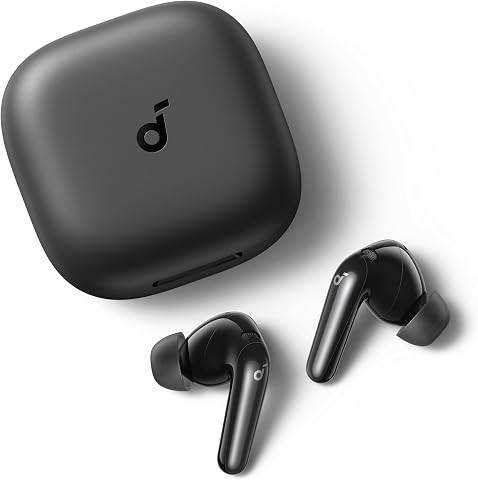
Set up your wireless noise-cancelling earbuds so they fit securely, connect to your phone or computer, and reduce background sound in the situations where you want to use them. This guide is for first-time users and anyone replacing or resetting a pair. Allow about 15-30 minutes for charging checks, pairing, fit adjustments, and a short listening test.
Soundcore P31i Translation Ear
TOZO NC9 Hybrid Active Noise C
Soundcore P30i by Anker Noise-
Soundcore P31i Translation Earbuds with Adaptive ANC
Noise cancellation: Adaptive ANC; claims reduction up to 52 dB Battery with ANC: Up to 8 hours per charge; up to 40 hours with case Battery without ANC: Up to 10 hours per charge; up to 50 hours with case
TOZO NC9 Hybrid Active Noise Cancelling Wireless Earbuds with LED Display
Noise cancellation: Hybrid ANC; claims reduction up to 45 dB Battery with ANC: Up to 10 hours per charge; up to 40 hours with case Battery without ANC: Up to 14 hours per charge; up to 60 hours with case
Soundcore P30i by Anker Noise-Cancelling Earbuds with Phone-Stand Charging Case
Noise cancellation: Adaptive ANC; claims reduction up to 42 dB Battery with ANC: Up to 6 hours per charge; up to 25 hours with case Battery without ANC: Up to 10 hours per charge; up to 45 hours with case
Difficulty: Beginner | Time: 15-30 minutes
What You’ll Need
Tools & Materials:
Wireless earbuds and their charging caseA phone, tablet, or computer with BluetoothThe earbuds’ charging cable, if the case needs powerThe manufacturer’s companion app, if available
Knowledge:
Basic Bluetooth settings on your deviceHow to identify the left and right earbuds
Keep the earbuds and case nearby, and check the model’s quick-start guide for its pairing method and control gestures. Button locations, app names, and noise-control features vary by model. Do not force an ear tip onto the earbud or insert anything into the ear canal to clean it.
Soundcore P31i Translation Earbuds with Adaptive ANC
The Soundcore P31i is our leading pick because its adaptive ANC is paired with a wider set of listening tools than the other two models. It claims noise reduction up to 52 dB, the highest stated figure in this lineup, and supports Hi-Res Audio with LDAC and spatial audio. That makes it the most compelling fit for buyers who want quiet for focused listening and richer audio options afterward. Its claimed reduction figure should be treated as a product specification, not a direct guarantee of performance in every environment.Against the P30i, the P31i adds LDAC, spatial audio, and translation, while both offer adaptive ANC and up to 10 hours per charge with ANC off. Battery endurance is less decisive with noise cancellation enabled: the P31i lists up to eight hours per charge and 40 hours total with ANC, compared with the P30i’s six and 25. The P31i also offers a faster quick-charge estimate—3.5 hours from a 10-minute charge—though its full listed charge time is three hours.We would choose it for its combination of ANC and extra capabilities, not because every buyer needs translation in over 100 languages. That feature may be useful for some travel and conversation scenarios, but app, language, and connection requirements are not detailed in the supplied specifications. The NC9 is the better alternative for shoppers prioritizing a long ANC-off battery estimate, while the P31i suits people who value audio features and adaptive noise control. Its three-hour charging time is a clear drawback, and ANC still reduces the stated battery figures.
Pros:
Adaptive ANC claims noise reduction up to 52 dB.Hi-Res Audio with LDAC and spatial audio support.Up to 40 hours total playback with ANC enabled.Ten-minute charge is listed to provide up to 3.5 hours of listening.
Cons:
ANC reduces the stated total playback from 50 to 40 hours.The listed full charging time is three hours.Translation features may be unnecessary for buyers seeking simple ANC earbuds.
Best for: Listeners who want adaptive ANC together with LDAC audio support, spatial audio, and translation features.
Not ideal for: Buyers who want the longest listed battery life with ANC on or a case that fully charges in less time.
Bottom line: We recommend the P31i for buyers who want the broadest ANC and audio feature mix, provided its longer full-charge time fits their routine.
“We recommend the P31i for buyers who want the broadest ANC and audio feature mix, provided its longer full-charge time fits their routine.”
TOZO NC9 Hybrid Active Noise Cancelling Wireless Earbuds with LED Display
For buyers who want fewer charging interruptions, the TOZO NC9 has the longest stated total playback in this group: up to 60 hours with ANC off and 40 hours with it on. The case’s battery display makes remaining charge easier to check at a glance. Its six ear tip sizes also give shoppers more options to work toward a secure seal, which can influence comfort and how effectively in-ear noise isolation works for an individual.Compared with the P31i, the NC9 is the battery-and-fit pick, not the audio-feature leader. It lists hybrid ANC up to 45 dB, six microphones with ENC, and app-based EQ with 32 options; the P31i claims a higher ANC reduction figure and adds LDAC and spatial audio. The P30i, meanwhile, offers a phone-stand case and adaptive ANC, but its stated total playback with ANC enabled is lower at up to 25 hours. The NC9 is a stronger match for long listening stretches, especially when its IPX8 water-resistance rating is useful to the buyer.There are tradeoffs behind the headline endurance. Its 60-hour figure requires ANC to be off, and the listed full charging time is two hours. The supplied information does not describe how the ANC adapts to different surroundings, so shoppers focused on adaptive control may prefer either Soundcore model. Bluetooth 5.3 is listed, versus Bluetooth 5.4 on the P30i; the details here do not establish a meaningful day-to-day difference in connection quality. We would pick the NC9 for its long stated battery, multiple fit choices, and water-resistance rating rather than for the strongest claimed ANC in the lineup.
Pros:
Up to 40 hours total playback with ANC on.Six ear tip sizes offer more fit choices than the Soundcore models list.Case includes a battery status display.IPX8 water-resistance rating and six microphones with ENC.
Cons:
The 60-hour total playback estimate applies with ANC off.ANC reduction is listed up to 45 dB, below the P31i’s stated figure.Full charging time is listed as two hours.
Best for: Listeners who value long playback, several ear tip sizes, an at-a-glance case battery display, and an IPX8 rating.
Not ideal for: Shoppers who specifically want adaptive ANC or the lineup’s highest stated noise-reduction figure.
Bottom line: We would choose the NC9 when long playback and fit flexibility matter more than having the highest stated ANC reduction or extra audio features.
“We would choose the NC9 when long playback and fit flexibility matter more than having the highest stated ANC reduction or extra audio features.”
Soundcore P30i by Anker Noise-Cancelling Earbuds with Phone-Stand Charging Case
The Soundcore P30i makes its case through practical design: the charging case doubles as a phone stand, and the earbuds pair adaptive ANC with a transparency mode. That setup gives us a straightforward option for switching between quieter listening and awareness of nearby sounds. Its claimed ANC reduction reaches up to 42 dB, the lowest figure among these three listings, though those figures alone cannot predict how well each model will suit a particular listener or setting.Compared with the P31i, the P30i has fewer headline audio extras: no LDAC, spatial audio, or translation is listed. It does share adaptive ANC and up to 10 hours per charge with ANC off, but its ANC-on estimate is six hours per charge and 25 hours with the case. That is notably shorter than the NC9’s 40-hour ANC-on total and the P31i’s same 40-hour figure. For buyers who value a case that props up a phone more than long ANC sessions, that compromise may be sensible.The P30i also lists four microphones with AI-enhanced call processing, Bluetooth 5.4, and IP54 water resistance. A 10-minute charge is said to provide up to two hours of use. However, the case takes a listed 2.5 hours to charge, longer than the NC9’s two hours and the P31i’s three-hour listing only by comparison to full-charge duration, not its quick-charge time. We see the P30i as the convenient everyday pick for people who will use its unusual case feature; shoppers who mainly want sustained ANC listening should look first at the NC9 or P31i.
Pros:
Charging case doubles as a phone stand.Adaptive ANC and transparency mode support different listening situations.Up to 45 hours total playback with ANC off.Four microphones with AI-enhanced call processing.
Cons:
ANC-on playback is listed at up to 6 hours per charge and 25 hours total.The case takes a listed 2.5 hours to charge.Its stated ANC reduction of up to 42 dB is the lowest figure in this lineup.
Best for: Listeners who want adaptive ANC and transparency mode in earbuds whose case can prop up a phone for hands-free viewing.
Not ideal for: People who need the longest ANC-on playback or want Hi-Res Audio with LDAC and spatial audio.
Bottom line: We recommend the P30i for everyday convenience and its phone-stand case, while buyers focused on longer ANC sessions should compare the NC9 and P31i.
“We recommend the P30i for everyday convenience and its phone-stand case, while buyers focused on longer ANC sessions should compare the NC9 and P31i.”
As an Amazon Associate we earn from qualifying purchases.
Before You Start
Charge the case and earbuds before setup. If the case has a status light or the app displays battery levels, use those indicators to confirm they have power. Turn Bluetooth on for the device you plan to use. If the earbuds were previously paired with another device, disconnect them there or put them into pairing mode according to the manufacturer’s instructions; some models connect automatically to a familiar device and may not appear in a new device’s list.
Test noise cancellation while seated in a quiet place. Active noise cancellation reduces steady background sounds, such as ventilation, but it does not remove every sound or replace hearing protection. Keep awareness of traffic, alarms, and people around you. Use a transparency or ambient mode when you need to hear your surroundings.
Step-by-Step Instructions
Step 1: Charge and inspect the earbuds
Place both earbuds in the charging case and check that they sit on their charging contacts. Connect the case to power if its battery is low. Look for the case light or app status to confirm charging, then inspect the ear tips for dirt, tears, or a loose fit. Replace a damaged tip before wearing the earbuds.
Tip: If a charging indicator does not appear, remove each earbud and reseat it. Make sure the case and earbud contacts are dry and free of debris.
Check: The case or app shows that the earbuds are charging or have enough battery for setup.
Step 2: Choose and fit the ear tips
Try the tip size already attached first. Insert the left earbud into your left ear and the right earbud into your right ear, then gently rotate or press each one as the manufacturer recommends. If the earbud feels loose, leaks sound, or needs constant adjustment, try another included tip size. Change one side at a time because your ears may need different sizes.
Tip: A secure seal helps passive isolation and can improve noise cancellation and bass. A tip should feel snug without causing pain or pressure.
Check: Both earbuds stay in place while you move your head gently, and neither causes discomfort.
Step 3: Put the earbuds into pairing mode
Open the case or remove the earbuds, then use the pairing control specified in the quick-start guide. Depending on the model, you may need to press and hold a case button, touch both earbuds, or select a pairing option in the companion app. Wait for the status light or spoken prompt that indicates pairing mode.
Tip: Do not assume that opening the case always starts pairing. If the earbuds connect to a previously used device, disconnect that device or follow the model’s steps to enter pairing mode manually.
Check: A light or voice prompt indicates that the earbuds are discoverable.
Step 4: Pair with your phone or computer
Open Bluetooth settings on your device and wait for available devices to appear. Select the earbuds by their listed name, then accept the pairing prompt if one appears. If the manufacturer’s app is part of setup, install or open it and follow its prompts to finish connecting, update settings, or install a firmware update. Keep the earbuds close to the device during this process.
Tip: If you see several similar device names, use the model name printed on the case or in the instructions. Avoid selecting a separate entry for a case or accessory unless the manufacturer tells you to.
Check: Your device lists the earbuds as connected, and a short audio test plays through both earbuds.
Step 5: Set noise control and device options
Open the companion app or use the earbud controls to find noise-control settings. Select noise cancellation, transparency or ambient sound, or the normal mode. If available, start with a moderate cancellation level and adjust it to your comfort. Review options such as automatic pause, touch controls, and call settings only if you need them.
Tip: Some earbuds offer adaptive control that changes modes based on sound or location. Turn it off temporarily if you want to compare modes under the same conditions.
Check: The selected mode appears in the app or is confirmed by a tone or spoken prompt.
Step 6: Test the fit, sound, and controls
Play a familiar song or spoken audio at a low volume. Check that sound comes from both sides, then test the pause, volume, and noise-control gestures listed for your model. Sit in a quiet room and switch between cancellation and transparency to hear the difference. If your app includes a fit test, run it and adjust the tips if it reports a poor seal.
Tip: A test tone may sound different between modes because noise cancellation changes how steady background sound reaches your ears. Do not raise the volume sharply to compensate.
Check: Audio is clear in both earbuds, the controls respond as expected, and mode changes are audible or confirmed.
Step 7: Use the earbuds safely and store them
Set the volume to a comfortable level before listening for a long period. Use transparency or remove an earbud when you need to hear announcements, conversation, or nearby hazards. After use, wipe the earbuds with a soft, dry cloth and return them to the case. Follow the manufacturer’s cleaning directions for removable tips.
Tip: Keep the earbuds dry unless their product rating allows exposure to sweat or water. Do not charge wet earbuds or a wet case.
Check: The earbuds disconnect or enter their expected standby state in the case, and the case indicates that they are charging or stored.
Common Mistakes to Avoid
Choosing ear tips that are too small or too large. — Try the included sizes and check for a stable, comfortable seal on each side. Run the app’s fit test if available.Pairing while the earbuds remain connected to another device. — Disconnect the earlier device or use the manufacturer’s pairing-mode steps before searching for the earbuds.Expecting noise cancellation to block every sound. — Use cancellation for steady background noise, and switch to transparency when awareness matters. Keep volume moderate.Cleaning or charging earbuds while they are wet. — Dry the earbuds and case completely before charging, and follow the model’s care instructions.
Troubleshooting
Problem: The earbuds do not appear in the Bluetooth list.
Solution: Confirm they have battery, put them into pairing mode, and keep them near the device. Disconnect them from any device they have paired with before. If they still do not appear, use the manufacturer’s reset instructions and try pairing again.
Problem: Only one earbud connects or plays audio.
Solution: Place both earbuds in the case, confirm each is seated and charging, then remove them together. Check your device’s audio balance setting. If one side remains disconnected, follow the model’s instructions to resync or reset the earbuds.
Problem: Noise cancellation seems weak or uneven.
Solution: Adjust the ear tips to restore a seal, clean the tips and microphone openings as directed, and confirm cancellation is selected rather than transparency or normal mode. Check the app for fit guidance and mode settings.
Problem: Audio cuts out or sounds distorted.
Solution: Move the device closer, reduce obstacles between it and the earbuds, and pause other nearby Bluetooth connections if practical. Lower the volume, restart playback, and reconnect the earbuds. Check for a manufacturer firmware update if the problem continues.
What Success Looks Like
The earbuds appear as connected on your chosen device, play audio through both sides, and respond to their basic controls. Noise cancellation and transparency or ambient mode switch as expected. The earbuds feel secure without pain, and you can confirm their charge status in the case or app.
Next Steps
Use the app to review battery status and save any preferred noise-control setting. Clean the ear tips and earbuds according to the product instructions, and charge the case when needed. If you use the earbuds with a second device, pair that device through Bluetooth settings or the app; check whether your model supports multipoint before expecting it to stay connected to both at once. Contact the manufacturer’s support team if repeated resets do not resolve a charging, pairing, or audio fault.
Frequently Asked Questions
Do noise-cancelling earbuds block all outside sound?
No. Active noise cancellation works best on consistent low-frequency sounds, such as fans or engine rumble. Voices, sudden noises, and alarms can remain audible. Use transparency mode when you need more awareness.
Can I use noise cancellation without playing music?
Many models allow cancellation with no audio playing, but behavior varies. Select the cancellation mode in the app or with the earbud controls, then check the manufacturer’s instructions if the mode turns off automatically.
Why does one earbud sound less effective than the other?
A loose tip, blocked microphone opening, or poor fit can affect one side. Reseat the earbud, try a different tip size, and clean it as the manufacturer directs. If the difference remains, check the app’s fit test or contact support.
Can I connect the earbuds to more than one device?
Some models support multipoint connections, while others remember several devices but connect to only one at a time. Check the model’s specifications and app settings, then follow its instructions to add another device.