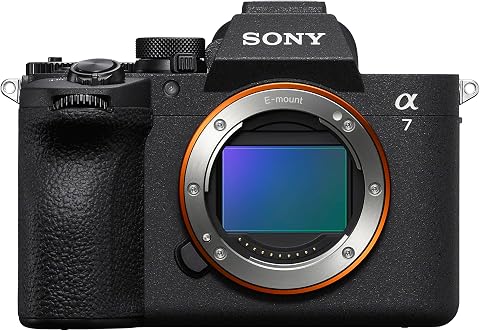
This 2026 photography gear checklist is for photographers and creators comparing equipment across shooting, printing, stabilization, lighting, and audio. It brings together six picks, from the Sony Alpha a7 V camera body to a dual-channel wireless microphone system, so you can consider a broader setup in one pass. Use it to focus your shortlist on the kind of work you actually do.
The sections follow practical gear categories: camera body, lenses, portable printer, gimbal, video lights, and microphones. Each one explains why the slot matters, offers a short checklist of details to review, and closes with a focused verdict for the named pick. Read each category on its own if you are filling a specific gap.
Before buying, confirm compatibility with the equipment you already own and review the manufacturer’s specifications for connections, supported formats, and included accessories. Think through where and how you will use each item, then compare the checklist with your needs. Match the gear to your workflow instead of assuming every category belongs in every kit.
The checklist
✓ Mirrorless Cameras✓ Camera Lenses✓ Portable Photo Printers✓ Camera Gimbals✓ LED Video Lights✓ Wireless Microphones
Mirrorless Cameras
A camera body shapes how you capture stills and video, so this slot deserves a close look when choosing the foundation of a kit. The Sony Alpha a7 V Full-Frame Mirrorless Camera Body AI AF 30fps is the named pick here. Its product name identifies it as a full-frame mirrorless body and references AI AF and 30fps; check the manufacturer’s specifications to understand exactly what those terms mean for your work. Confirm the features against your shooting priorities before deciding.
A common buying mistake is to focus on a headline feature while overlooking fit with existing lenses, accessories, and everyday handling. Check the mount and supported accessories against your current kit, and consider whether the body suits the way you shoot: handheld, on a support, or as part of a video setup. Review the dimensions and controls in person if possible, especially if you expect to carry it for long sessions. Compatibility and handling matter together.
Also verify which items are included in the body package and what you would need to complete your setup. Read the official specifications for recording formats, connectivity, storage support, and power requirements rather than inferring them from the product name. If you are upgrading, list the lenses and accessories you intend to keep and confirm each one works as expected. Check the full system fit before committing.
What to look for:
Confirm the lens mount matches your lenses.Review official autofocus and frame-rate specifications.Check supported recording formats and storage requirements.Consider body dimensions, grip, and control layout.Verify included accessories and power needs.
Sony Alpha a7 V Full-Frame Mirrorless Camera Body AI AF 30fps
The Sony Alpha a7 V is a full-frame mirrorless camera featuring a 33.0-megapixel sensor, advanced BIONZ XR2 processing engine, and AI-based Real-time Recognition AF. It offers high-speed shooting at 30 fps with blackout-free bursts, 4K 120p video recording, and up to 16 stops of dynamic range for professional-quality images and videos.
Pros:
High-resolution 33 MP sensor with excellent dynamic rangeFast 30 fps blackout-free burst shootingAdvanced AI-based autofocus with real-time tracking4K 120p video recording for professional-quality footage
Cons:
Complex features may have a steep learning curve for beginnersHigh-end price point likely to be expensive
Best for: Photographers seeking a full-frame mirrorless body to anchor a compatible setup.
Not ideal for: Shoppers who have not confirmed lens and accessory compatibility.
Bottom line: Review the official specifications and mount compatibility to see whether this body fits your shooting needs.
Camera Lenses
Lenses influence framing and how a camera setup can be used across different subjects, making this slot central to a system decision. The NiSi Athena Prime 5-Lens Kit, E Mount, Drop-in Filter names five prime lenses, an E mount, and a drop-in filter. Check the manufacturer’s listing for the exact focal lengths, included filter details, and what comes in the kit. Confirm the focal lengths first so the set covers the perspectives you actually use.
A frequent mistake is assuming a multi-lens kit automatically suits every camera or production style. Verify that E mount matches your camera, then review how each lens fits your framing needs and working distance. Consider whether you regularly change lenses on location and how you will transport and organize a five-lens set. If you use filters, confirm which filter is included and how the drop-in system works with the specific lenses in the kit. Check the whole kit as a system.
Before buying, compare the exact kit contents with the lenses you already own to avoid gaps or overlap. Review the maker’s specifications for dimensions, focus operation, and any compatibility requirements. If you rely on accessories such as matte boxes or supports, confirm they work with the lenses rather than assuming a shared mount settles every fit question. Use the listing to verify details, especially if your camera setup is already established.
What to look for:
Confirm E mount compatibility with your camera.Review the exact focal lengths included.Verify the drop-in filter contents and fit.Check lens dimensions and focus operation.Compare kit coverage with lenses you already own.
NiSi Athena Prime 5-Lens Kit, E Mount, Drop-in Filter
The NiSi Athena Prime 5-Lens Kit is designed for full-frame Sony E Mount cameras, offering high-quality optics with minimal distortion and beautiful bokeh. It includes five lenses ranging from 14mm to 85mm, all with matched size and weight for seamless switching and professional filmmaking.
Pros:
High-quality optics with minimal distortion and chromatic aberrationMatched size and weight for effortless lens switching and gimbal useFlexible drop-in filter mount enhances creative controlExcellent bokeh and background separation for cinematic shots
Cons:
Some lenses lack front filter threads (e.g., 14mm)Premium price may be high for casual usersLimited to Sony E Mount cameras
Best for: E-mount users seeking a multi-lens prime set with a drop-in filter.
Not ideal for: Photographers who need different focal lengths or a different mount.
Bottom line: Verify the focal lengths, filter details, and camera compatibility before choosing the kit.
Portable Photo Printers
A portable printer can bring images out of a screen and into a physical format, while this named product also includes cutting in its title. The Liene PixCut S1 Inspire Kit Color Sticker Printer and Cutting Machine is the pick for this slot. Review the manufacturer’s specifications to learn which devices, media, and file types it supports and what the Inspire Kit contains. Start by checking its output and media against the prints you want to make.
A common mistake is to treat “portable” or “sticker” as enough information to know whether a printer suits a particular workflow. Confirm the printer’s dimensions and power needs for the places you plan to use it, then check how the cutting function handles the formats you expect to create. Verify the supported connection method for your phone, tablet, or computer rather than assuming it will pair with every device. Device and media compatibility come first.
Look closely at consumables and package contents before deciding. Confirm which paper or sticker media is supported, whether it is included, and how the printer and cutter are intended to be used together. If you want to print on the go, consider how you will carry the machine and its supplies as a set. Read the official instructions for setup and maintenance, and make sure the output size suits your intended projects. Plan for the complete print workflow.
What to look for:
Confirm supported phones, computers, and connection methods.Check compatible sticker media and output sizes.Verify what the Inspire Kit includes.Review the cutter’s supported formats and operation.Consider portability, power, and supply storage.
Liene PixCut S1 Inspire Kit Color Sticker Printer and Cutting Machine
The PixCut S1 combines thermal dye-sublimation printing and precision cutting in a Bluetooth-connected device controlled through the Liene app. It prints at 300 dpi, and its included photo paper is laminated during printing to create waterproof, scratch-resistant stickers.
Pros:
Combines printing and precision cutting in one deviceAI image extraction helps create custom sticker designsPrinted stickers are described as waterproof and scratch-resistantIncludes 180 sheets of photo and sticker paper
Cons:
Bluetooth connectivity may limit use to compatible nearby devicesPrint speed is listed as 1 page per minute
Best for: Creators who want a color sticker printer and cutting machine in one kit.
Not ideal for: Users seeking a printer for media or formats it does not support.
Bottom line: Check device support, media compatibility, and kit contents before choosing this printer.
Camera Gimbals
A gimbal is a support choice for camera work, so confirming its fit with your camera and intended setup is essential. The DJI RS 4 Pro Gimbal Stabilizer is the named pick. Check the manufacturer’s specifications for supported camera combinations, payload guidance, and compatible accessories; the product name alone does not establish whether your specific rig will fit. Verify the complete camera setup, including lens and attached accessories.
A common mistake is to judge compatibility by camera body alone. A lens, plate, cable, or other mounted accessory can change the overall configuration, so review the maker’s guidance for balancing and supported setups. Consider how you will transport and operate the gimbal, including whether its controls and mounting options suit the way you shoot. If you plan to switch between rigs, confirm that each configuration is supported and can be balanced as directed. Check each rig you plan to use.
Before purchase, review what is included in the package and whether the accessories you need are part of it. Confirm the applicable camera control connections and supported functions from official documentation, especially if you expect to control the camera from the stabilizer. Also consider how the gimbal fits your existing support and carrying arrangements. Let the specifications guide the match rather than relying on the model name or assumptions about your camera.
What to look for:
Check payload and supported camera combinations.Include lenses and accessories when assessing rig fit.Review balancing instructions for each planned configuration.Confirm camera control connections and supported functions.Verify package contents and accessory compatibility.
DJI RS 4 Pro Gimbal Stabilizer
The DJI RS 4 Pro is a professional gimbal stabilizer designed for DSLR and cinema cameras, featuring a 4.5kg payload capacity and 2nd-generation native vertical shooting capabilities. It includes advanced LiDAR autofocus with 76,800 ranging points, remote dual focus and zoom motor control, and supports up to 29 hours of battery runtime with an optional high-capacity grip.
Pros:
High payload capacity of 4.5kg with increased motor torqueEffortless 2nd-generation native vertical shooting for social contentAdvanced LiDAR autofocus system for accurate solo shootingLong battery life of up to 29 hours with optional grip
Cons:
Requires rebalancing when switching between horizontal and vertical modesDJI Ronin app is no longer available on Google Play, requiring website downloadKey accessories like the Focus Pro Motor and BG70 Battery Grip are sold separately
Best for: Creators whose camera configuration matches the manufacturer’s support guidance.
Not ideal for: Buyers who have not checked payload and rig compatibility.
Bottom line: Confirm your fully built camera rig is supported before choosing this gimbal.
LED Video Lights
Lighting is a key part of a video setup, and a two-light kit can be relevant when planning more than one light position. The Godox SL60IIBi Bi-Color LED Video Light Kit, 2-Pack is the pick for this slot. Its name identifies a bi-color LED video light kit with two lights; consult the official listing for color range, controls, included modifiers, and other specifications. Check the kit contents and color controls against your lighting plan.
A common buying mistake is to see “2-Pack” and assume all accessories needed for two complete setups are included. Confirm the stands, power supplies, modifiers, and carrying items listed in the package, and note whether you will need to supply any of them separately. Consider the space where you will use the lights, including how you will position and power each one. Plan for two usable positions, not just two light heads.
Review the manufacturer’s specifications for the color adjustment range and control options, then consider whether those suit your shooting environment. Check the lights’ dimensions and mounting requirements against your existing stands and modifiers. If you expect to use both lights together, plan how you will place them and manage power and cables in the available space. Confirm practical setup details before making this part of your kit.
What to look for:
Verify the color adjustment range and control options.Check included stands, power supplies, and modifiers.Confirm mounting compatibility with existing supports.Consider placement and cable management for two lights.Review dimensions and package contents.
Godox SL60IIBi Bi-Color LED Video Light Kit, 2-Pack
This two-light kit includes SL60II-Bi LED lights, softboxes, stands, umbrellas, reflectors, a barn-door kit, and a remote. The lights offer adjustable brightness from 0% to 100%, a 2800K–6500K color temperature range, 11 FX effects, and control through the Godox app, remote, or onboard buttons.
Pros:
Two lights with a broad range of included modifiers and accessoriesAdjustable color temperature and dimmable brightnessOffers app, remote, and onboard controlsBowens mount supports compatible lighting accessories
Cons:
The complete kit weighs 26.7 lbPower source is listed as a charging cable
Best for: Video creators planning a setup that uses two bi-color LED lights.
Not ideal for: Shoppers who need accessories or mounting options not included or supported.
Bottom line: Review the specifications and included accessories to confirm the kit suits your lighting setup.
Wireless Microphones
Audio is an important part of a video or interview setup, and the named pick provides two channels in its product title. The Sennheiser XSW 1-835 Dual-Channel Wireless Microphone System is the choice for this slot. Check the manufacturer’s documentation for what transmitters and microphones are included, supported frequencies, and connection requirements. Confirm the included components and connections for your recording equipment.
A common mistake is to assume that “dual-channel” tells you every detail about how many people can be recorded or how a system will connect to a camera, recorder, or mixer. Verify the included transmitters, microphone type, receiver outputs, and supported operating configuration from the official listing. Check the frequency and regional guidance for where you intend to use the system, and make sure the receiver can connect to your existing recording gear. Match the whole signal path before you buy.
Also consider how the system will fit your shooting style, whether that means interviews, presentations, or another setup. Review power requirements and included cables, and confirm whether you need additional adapters or accessories. If more than one person will use the system, check the manufacturer’s guidance for pairing and operation. Check the setup end to end, from microphone to recording device, so the system can work with the rest of your kit.
What to look for:
Confirm included transmitters, microphones, and receiver.Check receiver outputs against your recording device.Review supported frequencies and regional guidance.Verify power requirements, cables, and adapters.Confirm operation for the number of users you plan to record.
Sennheiser XSW 1-835 Dual-Channel Wireless Microphone System
This dual-channel handheld wireless microphone system includes two transmitters with cardioid dynamic capsules and a receiver with built-in antennas. One-button scanning and synchronization simplify setup, and up to 10 systems can be used simultaneously.
Pros:
Includes two handheld transmitters and a dual-channel receiverOne-button scanning and synchronization simplify setupCardioid capsules offer feedback rejection and high SPL handlingSupports up to 10 systems simultaneously
Cons:
Requires AA batteriesFrequency range is limited to 548–572 MHz
Best for: Creators seeking a dual-channel wireless microphone system for a compatible setup.
Not ideal for: Users whose recording gear or regional needs do not match system support.
Bottom line: Verify included components, connections, and frequency guidance before choosing this system.
If you are building a kit gradually, prioritize the item that removes your biggest current workflow limitation. Confirm camera and lens compatibility before expanding the imaging system; check the full rig before adding a gimbal; then assess lighting, audio, and printing based on the work you plan to produce. Buy in order of practical need, and verify specifications and package contents at each step.
You do not need to assemble every category at once. Use this checklist to compare each pick with your existing equipment, shooting habits, and intended output, then take the next step when the fit is clear. A well-matched kit starts with careful checks and grows around the projects you want to make.