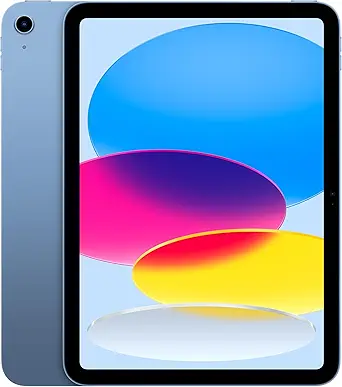
The Apple iPad 11-inch with A16 chip is my best overall pick because it offers the strongest mix of speed, polish, app support, and long-term usefulness in this group. The Fusion5 Helios 12 stands out for buyers who want a Windows tablet with a larger 2K screen and included stylus, while the Samsung Galaxy Tab A11+ makes more sense for budget Android buyers who want simple streaming, browsing, and family use. The main tradeoff is clear: Apple gives the smoothest tablet experience, Windows models offer more desktop-style flexibility, and low-cost Android tablets stretch the specs but often ask buyers to accept weaker ecosystem support. Storage, processor quality, keyboard support, and software updates matter more here than raw RAM claims alone. Keep reading for the full breakdown of which option fits each buyer type.
Key Takeaways
The Apple iPad 11-inch with A16 chip earns the top spot because it balances performance, software quality, display polish, and resale value better than the Windows and budget Android alternatives.Windows tablets in this lineup make the most sense for buyers who need desktop apps, but models with Intel Pentium, Core m3, or entry Intel chips are better for documents and browser work than heavy creative or gaming workloads.The Fusion5 Helios 12 is the strongest productivity-focused Windows pick because its 12-inch 2K display, 12GB DDR5 RAM, 512GB SSD, and included stylus give it a clearer work-ready role than smaller budget Windows tablets.The Samsung Galaxy Tab A11+ is the safer budget Android choice than the URAO X109 because brand support, software reliability, and accessory availability matter more than headline RAM numbers.Renewed devices can be smart value picks, but the older iPad 7th Generation and Surface Go 2 are best for light use because age, battery wear, and update runway limit their long-term appeal.
Our Top Best Computers, Tablets & Components Picks
Apple iPad 11-inch with A16 Chip, Liquid Retina Display, BlueBest Mainstream TabletDisplay: 11-inch Liquid Retina with True ToneProcessor: Apple A16 chipStorage: 128GBVIEW LATEST PRICESee Our Full BreakdownFusion5 WIN PRO Rugged Windows 11 TabletBest Rugged Windows TabletOperating System: Windows 11 ProProcessor: Intel 13th Gen Alder Lake N100RAM: 12GBVIEW LATEST PRICESee Our Full BreakdownFusion5 Helios 12 Windows 11 TabletBest Premium Windows TabletDisplay: 12-inch IPSResolution: 2000 x 1200 pixelsProcessor: Intel 13th Gen CPUVIEW LATEST PRICESee Our Full BreakdownSamsung Galaxy Tab A11+ 6GB RAM, 128GB StorageBest Entertainment ValueScreen Size: 11-inchRefresh Rate: Up to 90HzRAM: 6GBVIEW LATEST PRICESee Our Full BreakdownURAO X109 10.1-inch Android 16 TabletBest Budget Storage PickDisplay: 10.1-inch HD IPSResolution: 1280 x 800Processor: 2GHz octa-core AllwinnerVIEW LATEST PRICESee Our Full BreakdownApple iPad 7th Generation, 10.2-Inch, Wi-Fi, 32GB, Space Gray (Renewed)Best Budget iPad for Everyday UseBrand: AppleModel: iPad 7th GenerationDisplay Size: 10.2 inchesVIEW LATEST PRICESee Our Full BreakdownMicrosoft Surface Go 2 – 10.5-Inch Touch-Screen Laptop, Intel Core m3, 8GB RAM, 128GB SSD, Windows 11 Pro, Platinum (Renewed)Best Lightweight Windows TabletDisplay Size: 10.5 inchesResolution: 1920 x 1280, 216 ppiProcessor: Intel Core m3 up to 3.4HzVIEW LATEST PRICESee Our Full BreakdownQAZIPO 2-in-1 Laptop Tablet with Magnetic Keyboard, 12-Inch 2K IPS Touchscreen, 12GB RAM, 512GB SSD, Intel Pentium Gold 6500Y, Windows 11Best Detachable Laptop ReplacementScreen Size: 12 inchesResolution: 2K FHD IPS, 100% sRGBRAM: 12GBVIEW LATEST PRICESee Our Full Breakdown10.1-Inch Windows 11 Tablet with 6GB RAM, 128GB Storage, Intel ProcessorBest Battery-Life Windows TabletDisplay Size: 10.1 inchesOperating System: Windows 11 HomeProcessor: Intel processorVIEW LATEST PRICESee Our Full Breakdown
More Details on Our Top Picks
Apple iPad 11-inch with A16 Chip, Liquid Retina Display, Blue
I rank the Apple iPad 11-inch highest for buyers who want the smoothest tablet experience without moving into laptop territory. The A16 chip gives it stronger everyday speed than the Samsung Galaxy Tab A11+, while the Liquid Retina display with True Tone makes reading, sketching, streaming, and video calls feel more polished than on the URAO X109. Compared with the Fusion5 Helios 12, it is lighter and more app-friendly for casual and creative use, but it gives up the Windows ports and desktop software support. The main tradeoff is cost creep: Apple Pencil and keyboard accessories are extra, and 128GB can feel tight for media-heavy users. This is the safest pick, but not the most flexible one.
Best for: Students, families, and creative users who want a refined tablet for apps, notes, video calls, streaming, and light productivity.
Not ideal for: Buyers who need desktop Windows apps, built-in keyboard value, or lots of local file storage without paying more.
Display:11-inch Liquid Retina with True ToneProcessor:Apple A16 chipStorage:128GBCameras:12MP front and 12MP rear with 4K videoConnectivity:Wi-Fi 6Battery Life:All-day battery lifeDimensions:9.79 x 7.07 x 0.28 inchesWeight:1.05 poundsColor:Blue
Bottom line: I would choose this first for a polished tablet that feels fast, light, and easy to live with.
Fusion5 WIN PRO Rugged Windows 11 Tablet
The Fusion5 WIN PRO Rugged earns its spot because it solves a different problem than the Apple iPad 11-inch or Samsung Galaxy Tab A11+: it is built for field work, job sites, warehouses, and service teams. Its shockproof and dustproof design matters when a standard tablet would need a heavy case, and the Windows 11 Pro setup makes it better for legacy software, forms, spreadsheets, and device management. Compared with the Fusion5 Helios 12, this model gives up the bigger 2K screen and richer port list, but it wins on durability and warranty value. The 12GB RAM and 512GB SSD are generous for a rugged tablet. The catch is portability; it is likely heavier than consumer tablets, and the higher price makes less sense for couch browsing.
Best for: Field technicians, warehouse teams, contractors, and mobile workers who need Windows apps in rougher environments.
Not ideal for: Home users who mainly want streaming, reading, or lightweight travel, since the rugged build adds bulk and cost.
Operating System:Windows 11 ProProcessor:Intel 13th Gen Alder Lake N100RAM:12GBStorage:512GB SSD, expandable with MicroSDDisplay:10.1-inch Full HD IPS, 500 nitsBattery:6000mAhCharging:30W Type-C fast chargerConnectivity:Dual-band Wi-Fi and Bluetooth 5.0Warranty:2 years with accidental damage coverage
Bottom line: I would pick this for work sites where durability and Windows support matter more than slim design.
Fusion5 Helios 12 Windows 11 Tablet
I see the Fusion5 Helios 12 as the best fit when a tablet needs to behave more like a small PC. Its 12-inch 2K IPS display gives spreadsheets, browser tabs, PDFs, and drawing space more room than the Fusion5 WIN PRO Rugged, while dual USB-C, USB 3.0, HDMI, and a stylus make it more workstation-friendly than the Apple iPad 11-inch out of the box. The DDR5 memory and active cooling also help it sustain heavier Windows workloads better than basic Windows tablets. The downside is battery life: 4 hours under load is short, especially beside the iPad or URAO X109. It also lacks a physical keyboard, so laptop-style productivity still requires another purchase. This is a capable pick, but it favors power and ports over endurance.
Best for: Mobile professionals, students in Windows-based courses, and buyers who need ports, stylus input, and desktop app support.
Not ideal for: Travelers who need a full workday away from outlets or buyers expecting a keyboard in the box.
Display:12-inch IPSResolution:2000 x 1200 pixelsProcessor:Intel 13th Gen CPURAM:12GB DDR5Storage:512GB SSDBattery Life:4 hours averagePorts:2 x USB-C, USB 3.0, HDMI, 3.5mm jackWeight:690 grams, 1.52 poundsCamera:5MP front, 8MP rear
Bottom line: I would choose this when Windows flexibility, screen space, and wired connectivity matter more than battery life.
Samsung Galaxy Tab A11+ 6GB RAM, 128GB Storage
The Samsung Galaxy Tab A11+ is the value pick for buyers who care more about streaming, browsing, and family sharing than desktop-grade productivity. Its 11-inch 90Hz display should feel smoother than the URAO X109’s 1280 x 800 panel, and the quad speakers with Dolby Atmos give it a stronger media angle than the Apple iPad 11-inch at a lower expected cost. Compared with the Fusion5 Helios 12, it lacks Windows apps, HDMI, and laptop-style ports, but it is simpler for Android apps, video, and light multitasking. Expandable storage is a real advantage over the iPad for downloaded shows and files. The weaknesses are charger-related and detail-related: a 25W wall charger is separate, and Samsung does not list a specific battery capacity here.
Best for: Families, students, and casual Android users who want a smooth large-screen tablet for streaming, notes, browsing, and media storage.
Not ideal for: Workers who need Windows software, wired monitor output, or more precise published battery specifications.
Screen Size:11-inchRefresh Rate:Up to 90HzRAM:6GBStorage:128GB, expandableSpeakers:Quad speakers with Dolby AtmosFront Camera:5MPCharging:Fast charging support, 25W charger sold separatelyWarranty:2 years
Bottom line: I would pick this for an affordable Android entertainment tablet with better balance than the spec-heavy budget choices.
URAO X109 10.1-inch Android 16 Tablet
The URAO X109 is the pick I would treat as a budget-first Android tablet with unusually large storage claims. Its 128GB ROM with expansion up to 1TB beats the Apple iPad 11-inch for low-cost local media storage, and its Wi-Fi 6 and Bluetooth 5.4 are welcome on a lower-priced device. Compared with the Samsung Galaxy Tab A11+, though, the lower 1280 x 800 resolution and less established tablet ecosystem make it feel less refined for streaming and long-term support. The advertised 30GB RAM also needs careful reading, since it combines 6GB physical memory with 24GB virtual memory. That can help app switching, but it is not the same as true high-end RAM. Battery life is respectable at 8 hours, yet no GPS limits travel and mapping use.
Best for: Budget buyers who need expandable storage for downloads, kids’ media, offline reading, and basic Android apps.
Not ideal for: Buyers who want a sharper display, built-in GPS, premium app polish, or RAM claims that match conventional tablet specs.
Display:10.1-inch HD IPSResolution:1280 x 800Processor:2GHz octa-core AllwinnerRAM:30GB, 6GB plus 24GB virtualStorage:128GB ROM, expandable to 1TB via TF cardBattery Life:8 hours mixed useCharging:1.5-hour fast chargeCameras:5MP front, 8MP rearConnectivity:Wi-Fi 6 and Bluetooth 5.4
Bottom line: I would choose this for low-cost storage and basic Android use, not for premium display quality or polished productivity.
Apple iPad 7th Generation, 10.2-Inch, Wi-Fi, 32GB, Space Gray (Renewed)
I rank the Apple iPad 7th Generation as the budget iPad pick because it gives buyers the iPadOS app library, a larger 10.2-inch display, and Touch ID at a lower renewed price than the newer Apple iPad 11-inch with A16. Compared with the Microsoft Surface Go 2, this is less flexible for desktop-style Windows work, but it is simpler for streaming, reading, school apps, and family sharing. The A10 Fusion chip is fine for everyday tasks, while the 32GB storage ceiling is the main reason it sits behind newer tablets for long-term use. I also see the Wi-Fi-only design as a clear boundary: great for home and campus use, weaker for commuters who need built-in mobile data.
Best for: I’d buy it for families, students, or casual iPad users who want low-cost access to iPadOS apps over Wi-Fi.
Not ideal for: I’d skip it for travelers who need cellular data or anyone who stores large game, photo, or video libraries locally.
Brand:AppleModel:iPad 7th GenerationDisplay Size:10.2 inchesStorage:32GBConnectivity:Wi-FiBattery Life:Up to 10 hoursRear Camera:8MPFront Camera:1.2MP FaceTime HDWarranty:90 days limited warranty
Bottom line: I’d choose this iPad for low-cost access to Apple’s tablet ecosystem, as long as storage and cellular access are not priorities.
Microsoft Surface Go 2 – 10.5-Inch Touch-Screen Laptop, Intel Core m3, 8GB RAM, 128GB SSD, Windows 11 Pro, Platinum (Renewed)
The Microsoft Surface Go 2 earns my lightweight Windows role because it gives buyers Windows 11 Pro in a body that starts at 1.15 lbs. Against the QAZIPO 2-in-1, it has less RAM and storage, but the Surface line is better suited to buyers who care about a polished tablet feel, a sharp 1920 x 1280 PixelSense display, and a compact bag footprint. Compared with the 10.1-inch Windows 11 Tablet, the Core m3 and 8GB RAM make this feel more credible for browser work, documents, and light admin tools. The catch is cost creep: the Type Cover is sold separately, and 128GB can fill quickly once Windows apps, downloads, and offline files build up.
Best for: I’d buy it for mobile professionals or students who need Windows 11 Pro in the smallest practical Surface-style package.
Not ideal for: I’d skip it for buyers who expect a keyboard in the box or want more than 128GB of internal storage.
Display Size:10.5 inchesResolution:1920 x 1280, 216 ppiProcessor:Intel Core m3 up to 3.4HzRAM:8GBStorage:128GB SSDOperating System:Windows 11 ProfessionalWeight:Starting at 1.15 lbsBattery Life:Up to 9 hoursPorts:USB-C, 3.5mm headphone jack, Surface Connect port, MicroSDXC reader
Bottom line: I’d choose the Surface Go 2 when Windows portability matters more than bundled accessories or large internal storage.
QAZIPO 2-in-1 Laptop Tablet with Magnetic Keyboard, 12-Inch 2K IPS Touchscreen, 12GB RAM, 512GB SSD, Intel Pentium Gold 6500Y, Windows 11
I give the QAZIPO 2-in-1 Laptop Tablet the detachable laptop-replacement slot because it bundles the keyboard, 12GB RAM, and a 512GB SSD instead of asking buyers to add accessories later like the Microsoft Surface Go 2. It also has a larger 12-inch 2K IPS panel than the 10.1-inch Windows 11 Tablet, which helps with spreadsheets, split-screen research, and color-sensitive class projects. The buyer outcome is straightforward: more local storage and multitasking headroom in a portable Windows 11 setup. I would still temper expectations around the Intel Pentium Gold 6500Y; compared with the Fusion5 WIN PRO Rugged Windows 11 Tablet, this is less convincing for heavier workloads and more about study, remote work, and light creative tasks.
Best for: I’d buy it for students and remote workers who want Windows, a keyboard, Office 365, and roomy storage in one portable bundle.
Not ideal for: I’d skip it for video editors, developers, or power users who need a stronger processor and more ports.
Screen Size:12 inchesResolution:2K FHD IPS, 100% sRGBRAM:12GBStorage:512GB SSDProcessor:Intel Pentium Gold 6500Y, 3.4GHz boostOperating System:Windows 11 HomePorts:USB-C, Micro HDMI, headphone jackWeight:1.4 lbs / 0.63 kgIncluded Software:Office 365, 1-year subscription
Bottom line: I’d choose the QAZIPO if I wanted a ready-to-work Windows tablet bundle with more storage than the Surface Go 2.
10.1-Inch Windows 11 Tablet with 6GB RAM, 128GB Storage, Intel Processor
I place the 10.1-inch Windows 11 Tablet in the battery-first slot because its 6000mAh battery and quoted 12-hour runtime give it a clearer travel angle than the Microsoft Surface Go 2 or QAZIPO 2-in-1. It is also the simplest Windows pick here: 6GB RAM, 128GB storage, microSD expansion, USB 3.0, Micro HDMI, and Bluetooth 5.0 cover basic media, browser, and presentation needs. That said, this is a utility tablet, not a premium hybrid. The plastic shell will not feel as refined as the Surface Go 2, and the missing display-resolution and camera detail makes it harder for me to recommend for creative work or frequent video calls. It belongs with buyers who prize runtime over polish.
Best for: I’d buy it for travelers, field staff, or students who need a low-cost Windows tablet with long runtime and expandable storage.
Not ideal for: I’d skip it for buyers who care about premium materials, sharp display specs, or reliable camera quality for video meetings.
Display Size:10.1 inchesOperating System:Windows 11 HomeProcessor:Intel processorRAM:6GBStorage:128GBExpandable Storage:Up to 408GB with microSDBattery Capacity:6000mAhBattery Life:Up to 12 hoursConnectivity:Wi-Fi, USB 3.0, Micro HDMI, Bluetooth 5.0
Bottom line: I’d choose this tablet when battery life and low-cost Windows access matter more than display polish or build quality.
How We Picked
I ranked these picks by weighing real buyer outcomes over spec-sheet flash: everyday speed, display quality, software ecosystem, keyboard or stylus usefulness, storage, build quality, update outlook, and value. Because this roundup mixes iPads, Android tablets, Windows tablets, renewed devices, and 2-in-1 laptop tablets, I gave extra weight to how well each product fits a clear role rather than treating every device as if it solves the same problem.
The order favors products that are easier to recommend to more people. The Apple iPad 11-inch leads because it has the broadest appeal and fewest compromises, while the Fusion5 Helios 12 ranks high for Windows buyers who need a bigger screen and pen input. Budget and renewed picks earn places when they offer a specific advantage, but they sit lower when limited storage, older processors, uncertain battery health, or weaker software support narrows who should buy them.
Factors to Consider When Choosing Best Computers, Tablets & Components
Choosing among the best computers, tablets & components in this lineup is less about finding the biggest number on the box and more about matching the operating system, screen size, storage, and accessory support to the way the device will be used. I would start with the job the device needs to do, then decide how much flexibility, portability, and lifespan are worth paying for.
Choose The Operating System Before The Specs
iPadOS, Android, and Windows solve different problems, even when the hardware looks similar. The Apple iPad is the easiest recommendation for app quality, media, schoolwork, drawing, and long-term software support, but it is less natural if the buyer needs full desktop programs. Windows tablets such as the Fusion5 Helios 12, Surface Go 2, and QAZIPO 2-in-1 are better for familiar file management, external drives, and work apps, yet their lower-power chips can feel slower under heavier loads. Android options like the Samsung Galaxy Tab A11+ are good for streaming, browsing, reading, and family use, but they are weaker as laptop replacements. A common mistake is buying Windows only because it sounds more powerful; in this price range, the chip and cooling matter as much as the operating system.
Do Not Let RAM Claims Decide The Purchase Alone
RAM matters, but processor quality, storage speed, and software tuning often matter more in daily use. A tablet claiming very high total RAM may include virtual memory, which borrows storage space and does not behave like true physical memory. That is why the iPad with an A16 chip can feel more responsive than budget devices with larger advertised RAM figures. The Fusion5 Helios 12 looks stronger than many Windows budget tablets because it pairs 12GB DDR5 RAM with a 512GB SSD and a larger work-friendly display. For light browsing and video, 6GB RAM can be enough; for multitasking in Windows, I would rather have 12GB RAM plus SSD storage than a cheaper device with cramped memory and slower storage.
Match Screen Size To The Actual Workload
A 10-inch tablet is easier to carry, but a 12-inch display is far better for split-screen work, spreadsheets, note-taking, and long typing sessions. The iPad 11-inch sits in the sweet spot for most people because it is portable without feeling cramped. The Fusion5 Helios 12 and QAZIPO 12-inch 2K models make more sense for buyers who want a small laptop alternative, especially with a keyboard or stylus. Smaller Windows tablets can feel crowded because desktop apps are designed around pointer accuracy and more screen space. Buyers who mostly stream video, read, or use a tablet on the couch can save money with a smaller screen, while anyone replacing a laptop should lean larger.
Budget For The Keyboard, Pen, And Storage You Will Need
The device price can be misleading when accessories are part of the real purchase. A tablet meant for school or work may need a keyboard, case, stylus, charger, hub, or cloud storage plan, and those extras can change the value ranking fast. The Fusion5 Helios 12 has an advantage because a stylus is included, while the QAZIPO package is appealing because the magnetic keyboard is part of its 2-in-1 pitch. The iPad may be the better device overall, but adding Apple-compatible accessories can raise the final cost. Storage is just as practical: 32GB on the renewed iPad 7th Generation is restrictive in 2026, while 512GB on several Windows models gives more breathing room for files and offline work.
Renewed Devices Are Best When The Price Gap Is Large
Renewed products can be smart buys, but age changes the risk calculation. The renewed iPad 7th Generation and renewed Surface Go 2 can make sense for kids, casual browsing, basic school portals, or a secondary device, especially when the discount is steep. They are less appealing if the buyer expects years of fast updates, all-day battery life, or smooth multitasking. Battery health is the biggest unknown, followed by cosmetic wear and accessory condition. I would only choose a renewed model here when the return policy is clear and the savings are large enough to justify older hardware.
Know When To Pay More
Paying more makes sense when the device will be used every day for work, school, travel, or creative tasks. The Apple iPad 11-inch earns its premium because it should feel faster for longer, has stronger app support, and is easier to recommend across many uses. The Fusion5 Helios 12 is the better upgrade path for buyers who need Windows flexibility and a larger screen, even though it cannot match the iPad for tablet app polish. Paying less is reasonable for streaming, email, recipes, simple browsing, and children’s use. The wrong place to save money is storage: a cheap device with too little space can feel limiting long before the hardware actually fails.
Frequently Asked Questions
Should I Buy The Apple iPad 11-Inch Or A Windows Tablet From This List?
I would choose the Apple iPad 11-inch if the buyer wants the smoothest all-around tablet for apps, streaming, schoolwork, drawing, and general productivity. It has the strongest mix of performance and long-term appeal, but it is not the best fit for full desktop software. A Windows tablet such as the Fusion5 Helios 12 makes more sense if the buyer needs Windows apps, file handling, printer support, or a more laptop-like workflow. The tradeoff is that budget Windows tablets can feel less fluid as tablets and may struggle with demanding multitasking. The choice should start with software needs, then move to screen size and storage.
Is The Fusion5 Helios 12 Better Than The Fusion5 WIN PRO Rugged Tablet?
The Fusion5 Helios 12 is the better pick for most productivity buyers because its 12-inch 2K display, DDR5 memory, large SSD, and included stylus create a stronger everyday work setup. The Fusion5 WIN PRO Rugged is more specialized; its appeal is durability and field-friendly use rather than being the best desk or couch tablet. If the device will be carried into rougher settings, used around job sites, or handled by many people, the rugged model has a clearer reason to exist. For note-taking, documents, web research, and media, the Helios 12 feels like the more balanced choice. I would only prioritize ruggedness when durability is the main buying reason.
Are The Renewed iPad 7th Generation And Surface Go 2 Still Worth Buying In 2026?
They can be worth buying when the price is low and expectations are realistic. The renewed iPad 7th Generation is best for simple tablet use, but its 32GB storage is tight for apps, downloads, and shared family use. The Surface Go 2 offers Windows flexibility in a compact body, yet its older Core m3 chip and renewed battery status make it better for light office tasks than heavy workloads. These are value picks, not future-proof picks. I would buy renewed only from a seller with a clear return window and condition grading.
Which Pick Makes The Most Sense For Students?
For most students, the Apple iPad 11-inch with A16 chip is the best fit because it handles note-taking, reading, video calls, learning apps, and general assignments with the least friction. Students who need Windows-only software should move toward the Fusion5 Helios 12 or QAZIPO 2-in-1 instead, especially if a keyboard is part of the plan. The Samsung Galaxy Tab A11+ works for younger students or light coursework, but it is less convincing as a main academic device. Storage should not be ignored, since class files, PDFs, apps, and offline video add up quickly. I would avoid the 32GB renewed iPad as a primary school device unless the budget is very tight.
Do Any Of These Replace A Laptop?
Some can replace a laptop for light work, but none should be treated like a full-power notebook for demanding tasks. The QAZIPO 2-in-1 and Fusion5 Helios 12 come closest because they run Windows and are built around keyboard, storage, and productivity use. The iPad can replace a laptop for many people when paired with a keyboard, but desktop software gaps may matter for certain jobs. Smaller Windows tablets with 6GB RAM and 128GB storage are better as secondary devices than full replacements. If the buyer edits large media files, runs complex spreadsheets, or keeps many apps open at once, a true laptop is still the safer purchase.
Conclusion
My best overall pick is the Apple iPad 11-inch with A16 chip because it gives the broadest group of buyers the best balance of speed, display quality, app support, and long-term usefulness. The Samsung Galaxy Tab A11+ is my best value choice for casual Android buyers, while the Fusion5 Helios 12 is the best Windows productivity pick thanks to its bigger 2K screen, 12GB DDR5 RAM, 512GB SSD, and included stylus. For beginners, I would steer toward the iPad or Galaxy Tab A11+ because they are simpler to live with than low-cost Windows tablets. For rugged or field use, the Fusion5 WIN PRO Rugged has the clearest role, and for buyers chasing a laptop-like bundle, the QAZIPO 2-in-1 is the most direct match. The renewed iPad 7th Generation and Surface Go 2 are best treated as budget secondary devices, not long-range main machines.